
Choosing a template or a blank workspace
AI Workspaces
2 min readEdit
On this page⌄
When you create a new Workspace, you can either start from a template (a pre-configured assessment with a defined methodology) or from a Blank Workspace (a free-form, chat-driven run). This article explains when to pick which.
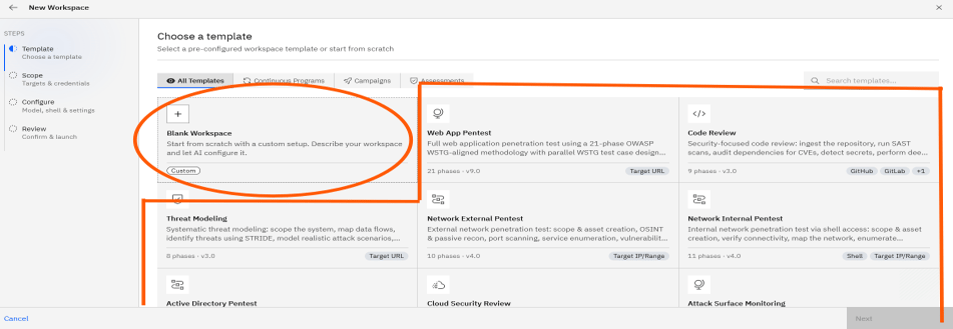
When to use a Template Workspace
Templates are best for standard, repeatable security assessments where you already know the testing scope. Pick a Template Workspace when:
- You're running a recognized assessment type (Web App Pentest, Network External, API Security Testing, Cloud Review, Code Review, etc.).
- You want a proven methodology with phases, testing areas, and compliance mapping (OWASP, ASVS, PCI DSS, SANS Top 25).
- You want a structured assessment with a phases timeline and a richer, comparison-friendly report.
- You want to set up a recurring schedule from the wizard itself.
The Template flow is a 4-step guided wizard: Template → Scope → Configure → Review.
When to use a Blank Workspace
Blank Workspaces are best for custom, exploratory, or one-off requests that don't fit a standard template. Pick a Blank Workspace when:
- Your task doesn't match any template (e.g., "validate this CVE proof-of-concept against our staging server").
- You want the AI to plan the methodology itself based on a free-form description.
- You want a chat-first experience rather than a structured assessment.
The Blank flow is a 2-step wizard: Template → Describe & Launch.
Side-by-side comparison
Template Workspace | Blank Workspace | |
|---|---|---|
Best for | Standard, repeatable assessments | Custom or exploratory requests |
Setup style | 4-step wizard | 2-step wizard |
Methodology | Pre-baked phases + compliance mapping | AI plans it from your description |
Target field | Required, type-specific | Optional, free-form |
Credentials | Selected from a list | Attach during chat (optional) |
Recurring schedule | Built into the wizard | Configurable later from AI → Schedules |
Output | Structured assessment with phases timeline | Open-ended, chat-driven workspace |
Recommendation
Start with a template for your first pentest. It enforces a proven methodology and produces a richer, comparison-friendly report. Use a Blank Workspace once you're comfortable with the platform and want to drive a custom workflow.
Note: A Blank Workspace can always be promoted into a structured assessment later by asking the agent in chat — for example, "Save this as an Engagement and produce a formal Web App Pentest report."
More in Agentic Pentesting
Was this page helpful?