
Alerts vs. Vulnerabilities vs. Findings
What's the Difference?
If you've spent time in Strobes instance, you've likely noticed three terms that show up across dashboards and menus: Alerts, Vulnerabilities, and Findings. They sound similar, and they're closely related, but they represent three different scopes of data. This guide breaks down what each one means, where the data comes from, and how they fit together.
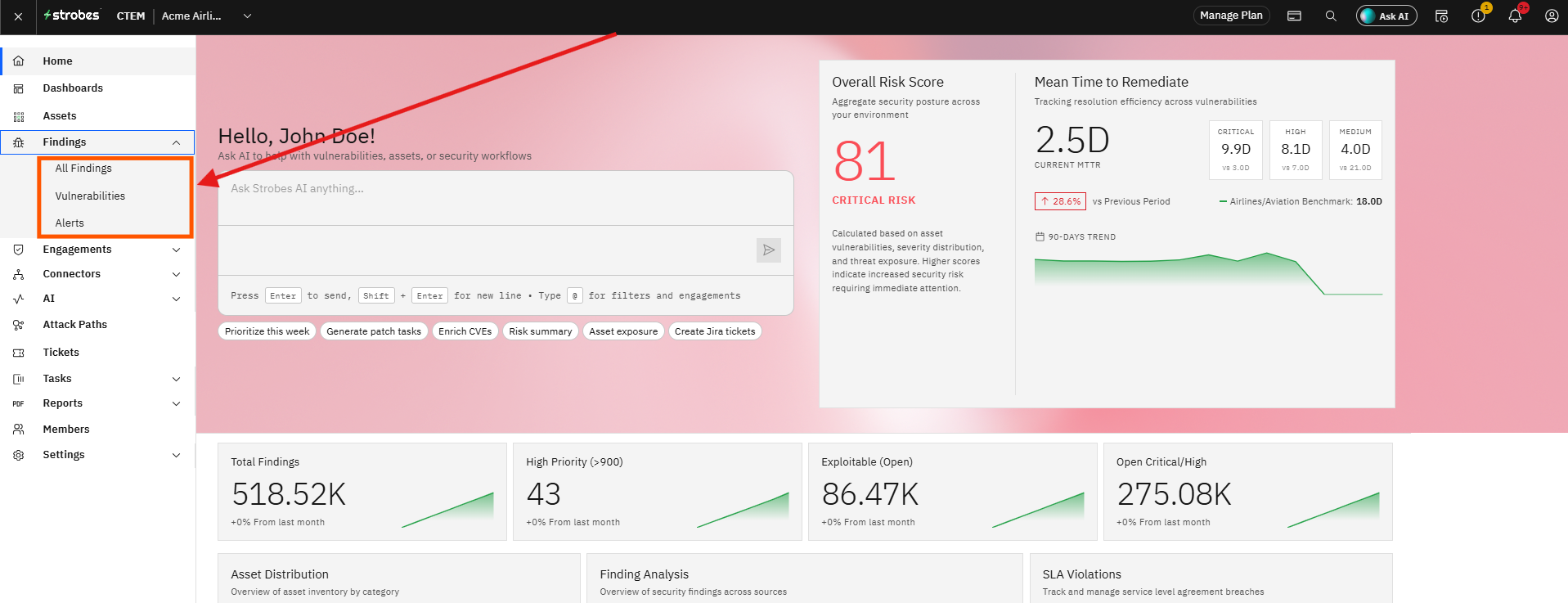
In short:
Findings is the umbrella term. Everything Strobes surfaces about your security posture — whether it's a leaked credential on the dark web or a missing patch on a server — is a Finding. Underneath that umbrella, every Finding falls into one of two buckets: it's either an Alert or a Vulnerability, depending on where it came from.
Findings: the combined view
Findings is simply the combined view of Alerts and Vulnerabilities in one place. When you open Finding Overview in Strobes, "All Findings" shows every issue across both categories, so you can triage and prioritize your entire risk picture without switching between modules. If you want to narrow that view down to just the scanner-based issues, you can switch to a filtered view that excludes Alerts — but by default, Findings gives you everything.
Vulnerabilities: everything else
Vulnerabilities cover every other type of Finding — in other words, anything that isn't sourced from ASM or CSPM. This is the traditional vulnerability management side of the platform: results from scanning a known asset (a web app, a container image, a code repository, a network range) for a specific, identifiable weakness.
This includes Findings from sources like:
- Network Vulnerability Assessment (VA)
- SAST and DAST application scans
- SCA / SBOM (open-source and dependency scanning)
- Container security scans
- Pentest-as-a-Service (PTaaS) engagements
If a scan pointed at a specific target and came back with a specific weakness — often tied to a CVE or CWE — that's a Vulnerability.
Alerts: exposure signals from ASM and CSPM
Alerts are the Findings that come from Strobes' exposure-monitoring sources: Internal ASM, Custom ASM, and CSPM. These modules watch your external attack surface and cloud environment continuously, rather than scanning a specific asset for a specific flaw. As a result, Alerts tend to describe things happening around your organization rather than a defect discovered inside a piece of code or infrastructure.
In practice, this covers things like:
- Exposed credentials or company data surfacing on the dark web
- Newly discovered assets, domains, or shadow IT picked up by ASM
- Social engineering and phishing exposure
- Email security issues
- Cloud misconfigurations flagged by CSPM
You'll find these under Alert Management in the platform, with categories such as Network Security, Dark Web, Social Engineering, and CMS & Plugin Security.
Quick reference
Term | What it includes | Typical sources |
|---|---|---|
Alerts | Exposure and posture signals about your external footprint and cloud environment | Internal ASM, Custom ASM, CSPM |
Vulnerabilities | Scanner-identified weaknesses in a specific asset | VA, SAST, DAST, SCA/SBOM, Container Security, PTaaS |
Findings | Everything — the combined total | Alerts + Vulnerabilities |
Why this distinction matters
Knowing which bucket a security issue falls into helps you route it to the right team and understand the right kind of remediation.
An Alert about a leaked credential usually calls for a response action (rotate the credential, investigate exposure) rather than a code fix.
A Vulnerability, on the other hand, usually points to a specific patch, configuration change, or code fix on a specific asset. Findings gives you the full picture so nothing slips through the cracks, while Alerts and Vulnerabilities let you focus on one type of work at a time.