
Reaching On-Prem Targets from Strobes SaaS
This article explains the connectivity options available for reaching targets behind your firewall — and which to use for each scenario.
Note: Strobes does not require you to open inbound firewall holes, set up site-to-site VPNs, or run a long-lived gateway appliance. Every option below is outbound-only TLS from your side.
Overview
The three connectivity options
Cloud Browser / Sandbox | Local Browser Bridge | Agent Shell | |
|---|---|---|---|
Where it runs | Strobes-managed sandbox | Your laptop or desktop | A host inside your network (server, VM, or container) |
What it drives | Headless Chrome | Real Chrome or Firefox on your machine | A shell session — runs commands |
Setup time | Zero | ~5 minutes | ~10 minutes |
Inbound from Strobes | N/A | None | None |
Outbound from your side | N/A | HTTPS 443 | HTTPS 443 |
Persistent | No | Only while the bridge app is open | Yes — runs as a service |
Best for | Public web targets | Web targets behind VPN or SSO with hardware tokens | Network internal pentests, internal APIs, on-prem code repos |
Sees your browser cookies | No | Optional | No |
Required for Network Internal Pentest | No | No | Yes |
How to choose
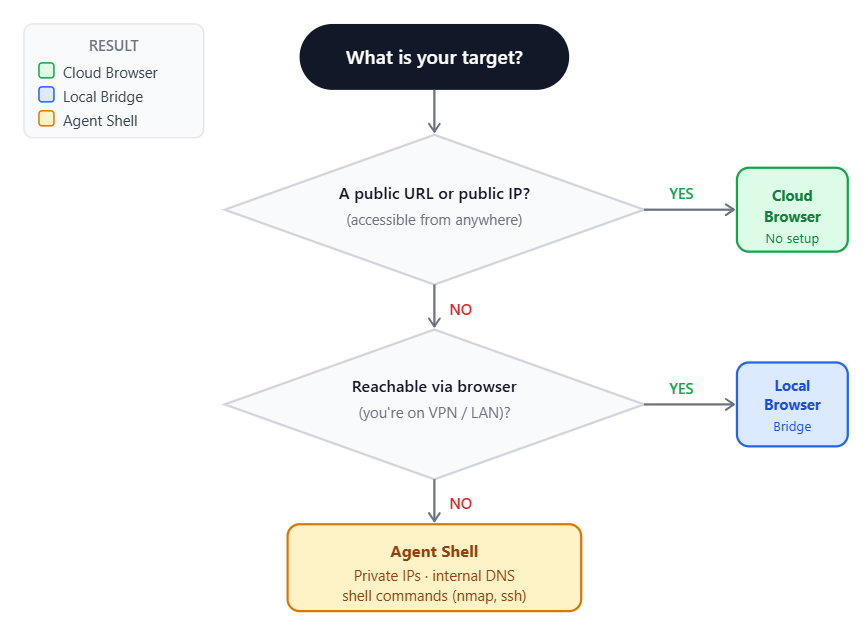
Scenarios
Pentest a public SaaS web app
Target: https://app.acme.com
Use the Cloud Browser (default). No additional install needed.
Pentest a staging app behind your corporate VPN
Target: https://staging.acme.internal
Your laptop is already on the VPN. Use the Local Browser Bridge on your laptop. The agent drives your local browser, which can reach *.acme.internal because your machine already can.
Pentest an internal IP range
Target: 10.0.0.0/16
Use the Agent Shell installed on a host inside that VPC or VLAN. A dedicated jumphost VM with reachability to the target subnet is strongly recommended.
Pentest an on-prem GitHub Enterprise repo
Target: https://git.acme.internal/org/repo
Use the Agent Shell on a host that can reach git.acme.internal. The agent will git clone over the shell connection.
Cloud audit with a VPC-restricted IAM role
Target: AWS account with an aws:SourceVpc-restricted role
Use the Agent Shell on an EC2 instance inside the trusted VPC. The role assume call originates from there, satisfying the source VPC condition.
Hardware-token-protected SSO on an internal admin app
Target: https://admin.acme.com (requires Yubikey)
Use the Local Browser Bridge with your default browser profile so the WebAuthn key is reachable. Tap your Yubikey when the agent navigates to the SSO challenge.
Network Requirements
Share this with your firewall team before deploying.
Direction | Source | Destination | Port | Reason |
|---|---|---|---|---|
Outbound | Shell host or Bridge laptop |
(region-specific) | 443/TCP | Control channel and job dispatch |
Outbound | Shell host (during a run) | Target hosts inside your network | Varies | Whatever the agent runs — curl, ssh, nmap, etc. |
Inbound | N/A | N/A | N/A | No inbound from Strobes is ever required |
Strobes hostnames by region:
Region | Hostnames |
|---|---|
EU |
,
|
US |
,
|
AU |
,
|
Sizing
Use case | Minimum host spec |
|---|---|
Local Browser Bridge | Your existing laptop |
Agent Shell — light use (a few targets) | 2 vCPU, 4 GB RAM |
Agent Shell — internal pentest (active port scans, multiple parallel jobs) | 4 vCPU, 8 GB RAM |
Agent Shell — long-running monitoring (Attack Surface, DevSecOps) | 4 vCPU, 8 GB RAM, 50 GB disk |
A Note on "Strobes Gateway"
Strobes does not currently ship a separate gateway or tunnel appliance. The Agent Shell and Local Browser Bridge cover the connectivity scenarios most customers need.
If you need persistent, multi-purpose connectivity for many targets behind a single perimeter, the recommended approach today is to deploy one Agent Shell on a jumphost and let the agent run network tools (curl, nmap, ssh, etc.) from there. In practice, that host functions like a gateway — it's the single point of entry for the agent into that network segment.
A first-class Gateway product is on the roadmap. This article will be updated when it ships.
Security Checklist
Before deploying in a production environment:
- Use a dedicated host for the shell — not a shared developer box
- Run as a non-root user unless your tools genuinely need root; if so, use Linux capabilities rather than full root
- Restrict the shell's outbound network to the target subnet plus the Strobes API only
- Enable shell logs (on by default) and forward them to your SIEM
- Rotate pairing tokens quarterly
- When decommissioning, disconnect the shell in the Strobes UI before tearing down the host
For the complete threat model, see 04 — Shell + Bridge Security Model.
Related Articles
- 01 — Strobes Agent Shell: Install & Pair
- 02 — Local Browser Bridge: Setup & Use
- 04 — Shell + Bridge Security Model